Why are guest messages not being translated in my inbox?
Last updated: February 17, 2026
Context
When communicating with guests who speak different languages, you may notice that while your messages are being translated to the guest's language, their messages appear in their original language instead of being translated to your language. This can happen when the translation feature is not properly enabled in your inbox.
Answer
To ensure that guest messages are translated to your language, you need to enable the translation toggle in your inbox.
Here's how to fix this:
Navigate to your inbox where you're viewing the conversation with the guest
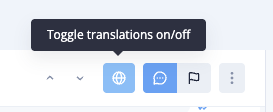
Look for the translation toggle button in the toolbar (it appears as a globe icon)
Click the toggle button to turn translations on
Once you toggle this feature on, guest messages should be correctly displayed in your language instead of their original language, while still maintaining the ability to translate your outgoing messages to the guest's language.