Changelog
Last updated: June 30, 2026
🗓 June 2026: Platform Improvements & New Features
June was a big month for getting paid and protected with less effort. Security deposits are now a complete, end-to-end workflow; pre-check-in can collect billing details and outstanding charges before guests arrive; and you can now reply to Instagram and Messenger right from the inbox. AI reply suggestions also got smarter — drawing on your own saved replies and guidebooks — alongside a cleaner calendar, inbox, and amenities experience throughout.
✨ New Features
Security deposits, managed end to end in Guestway. Create and track deposits straight from a reservation — card hold only or charge-and-refund, guest payment links, partial captures and refunds, and clear status updates for your team and your guests. Watch the full video on it here:
Set deposit rules once, at the property level. Apply the right deposit setup across listings, multi-units, and complexes instead of configuring each reservation by hand.
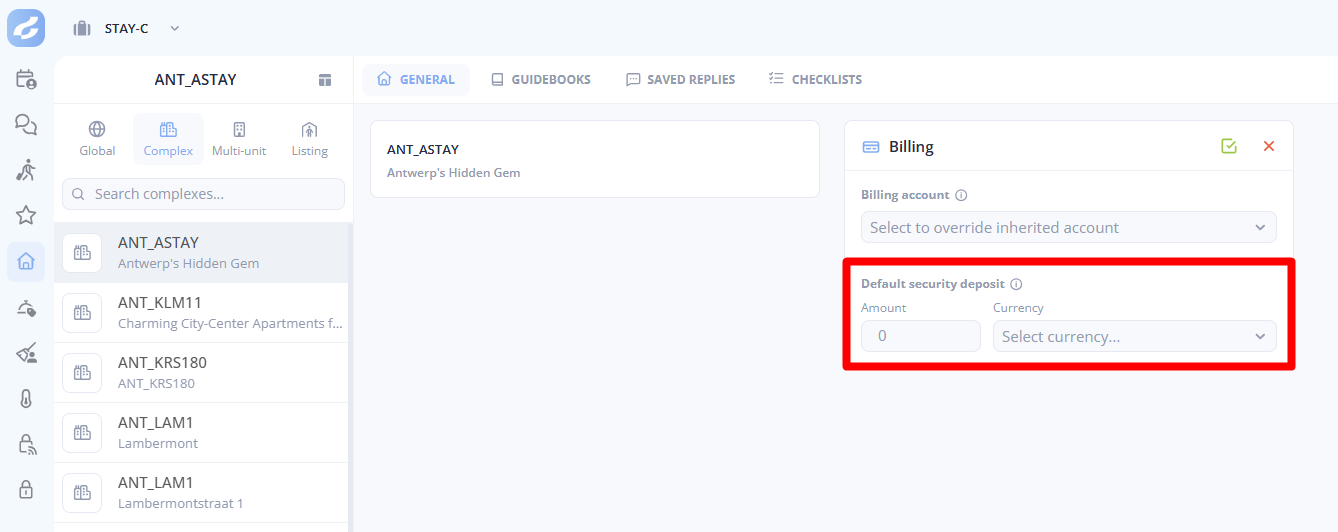
Deposit timing follows the stay automatically. Holds, releases, and extensions can be based on arrival or departure and stay aligned if reservation times change — and long stays keep their coverage with an automatic hold extension before it expires, alerting your team if something needs attention.
Saved cards can be reused for deposits. If a guest already has a usable card on file for their reservation, they may not need to re-enter their card details before a hold is placed.
Deposit activity now appears in the inbox. See when a guest saves a card, when a hold succeeds or fails, when funds are captured or released, and when refunds or expiries need attention — and pause or resume scheduled releases and refunds when plans change.
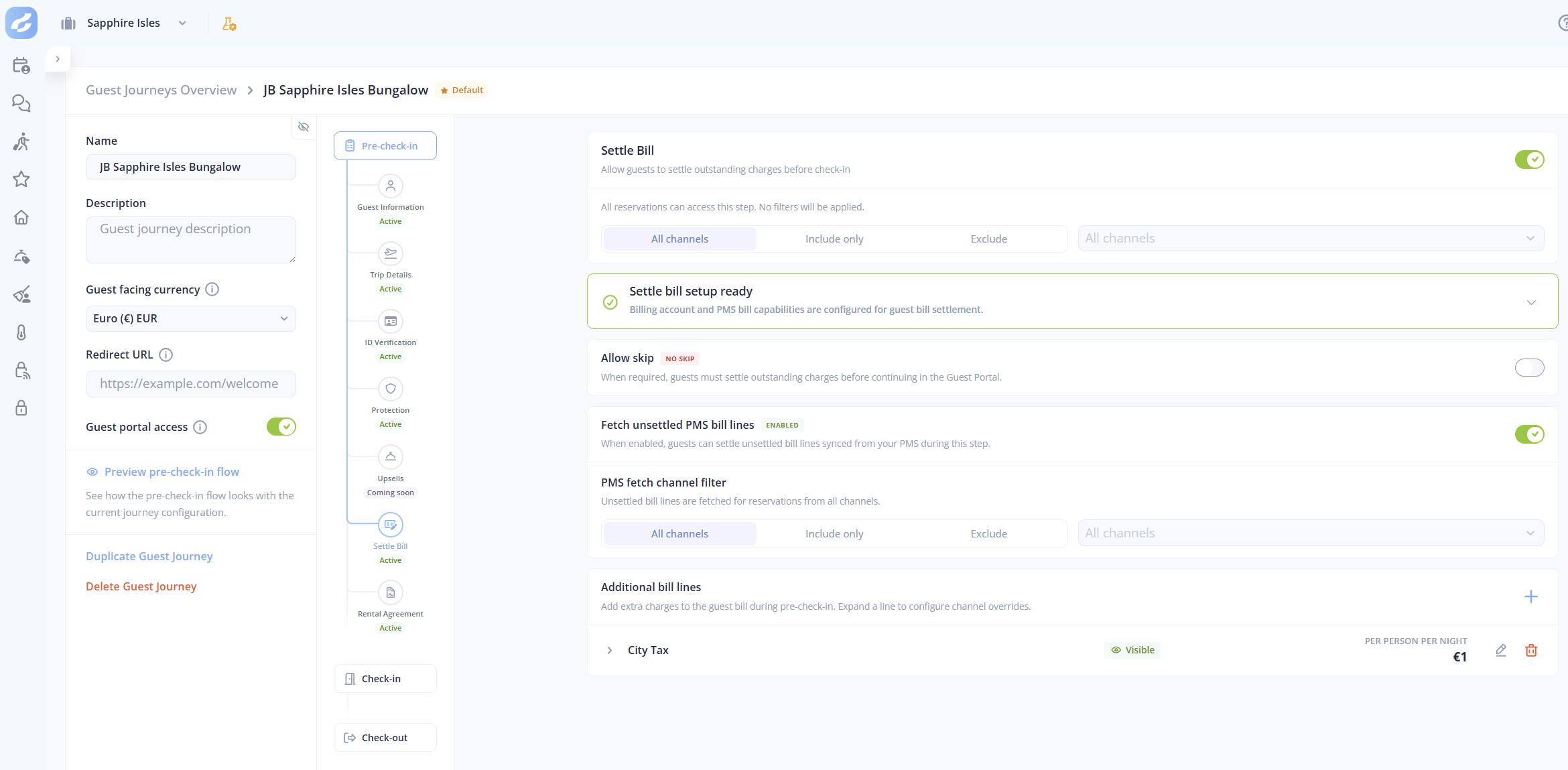
Collect outstanding charges during pre-check-in. Add a bill-settlement step so guests can review and pay remaining charges before arrival, and add extra fees — fixed, per-night, or per-person — directly into the guest journey. A great example here is charging the "City Tax" to your guests.
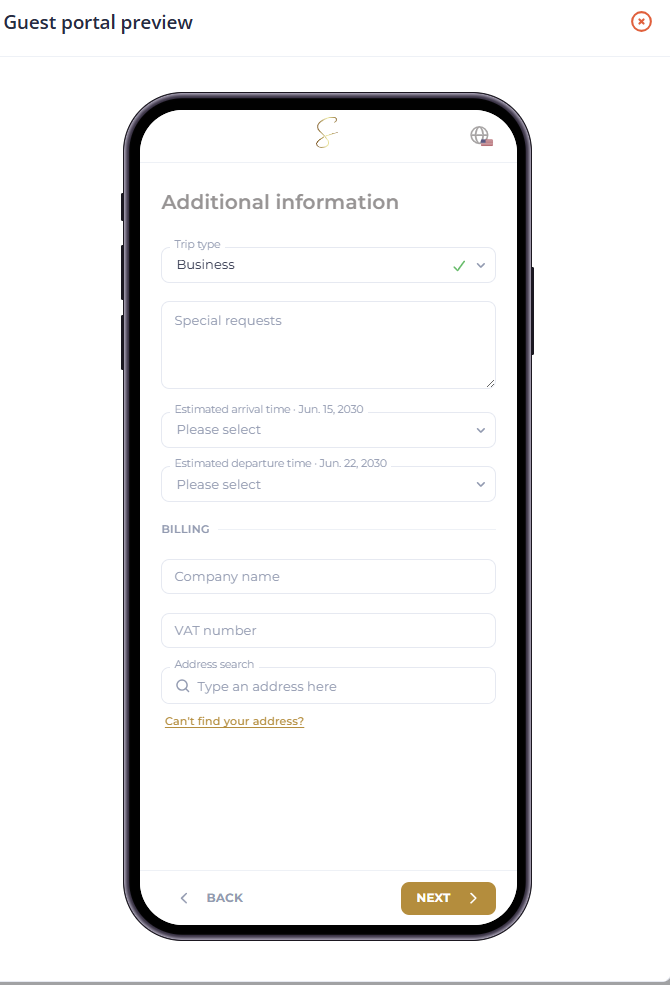
Capture business billing details at pre-check-in. When a stay is marked as a business trip, guests can provide company name, VAT number, and billing address, and your team can review them in the reservation summary. Guests can reuse their guest address as the billing address in a single tap.
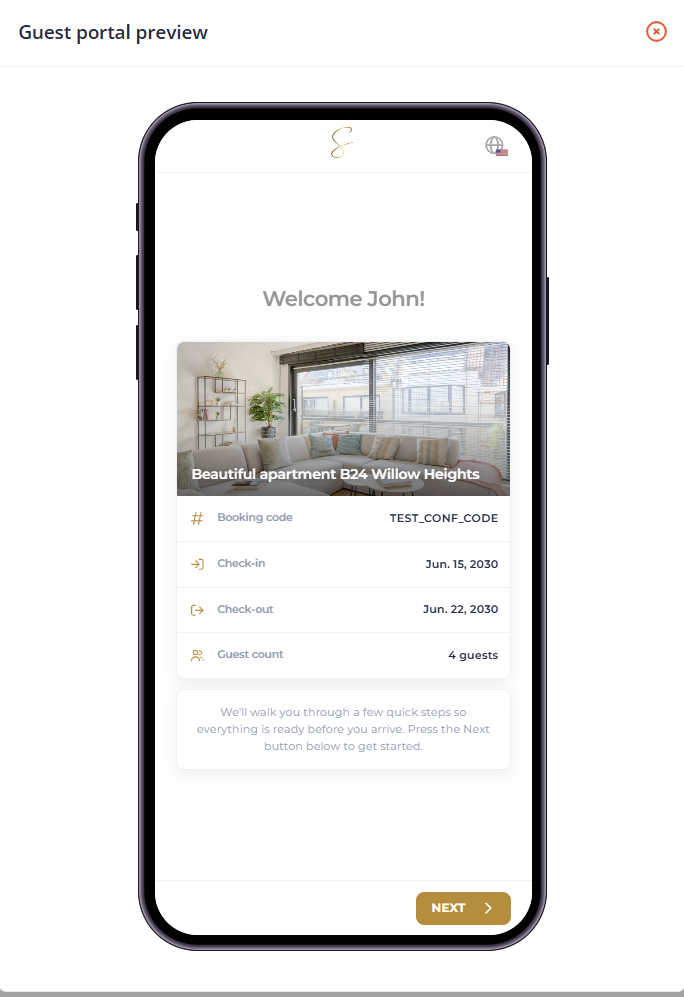
A warmer welcome screen, with address search. Pre-check-in now opens with a clear introduction — stay dates, booking code, guest count, and a property photo when available — and guests can search for their address with suggestions to fill in details faster and with fewer mistakes.
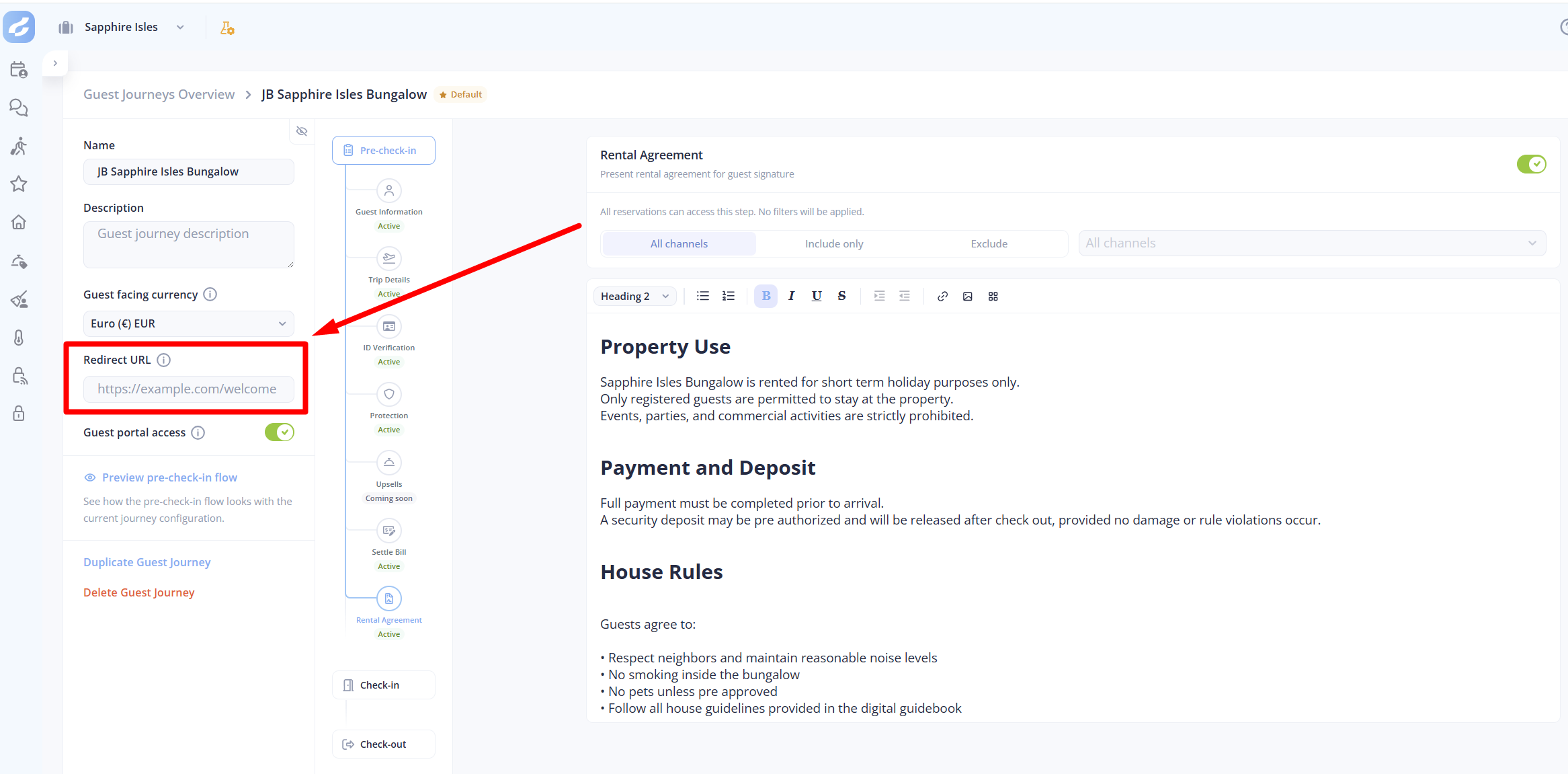
Send guests to a custom page after pre-check-in. Choose where guests land when they complete the pre-check-in, so you can guide them to your own portal if needed.
Reply to Instagram and Messenger from the inbox. Connect your Facebook Page and manage Instagram and Messenger conversations directly in Guestway.
Smarter AI reply suggestions. Suggestions now draw on your saved replies and guidebook content (next to the conversation history & reservation information) for answers that are specific to the property.
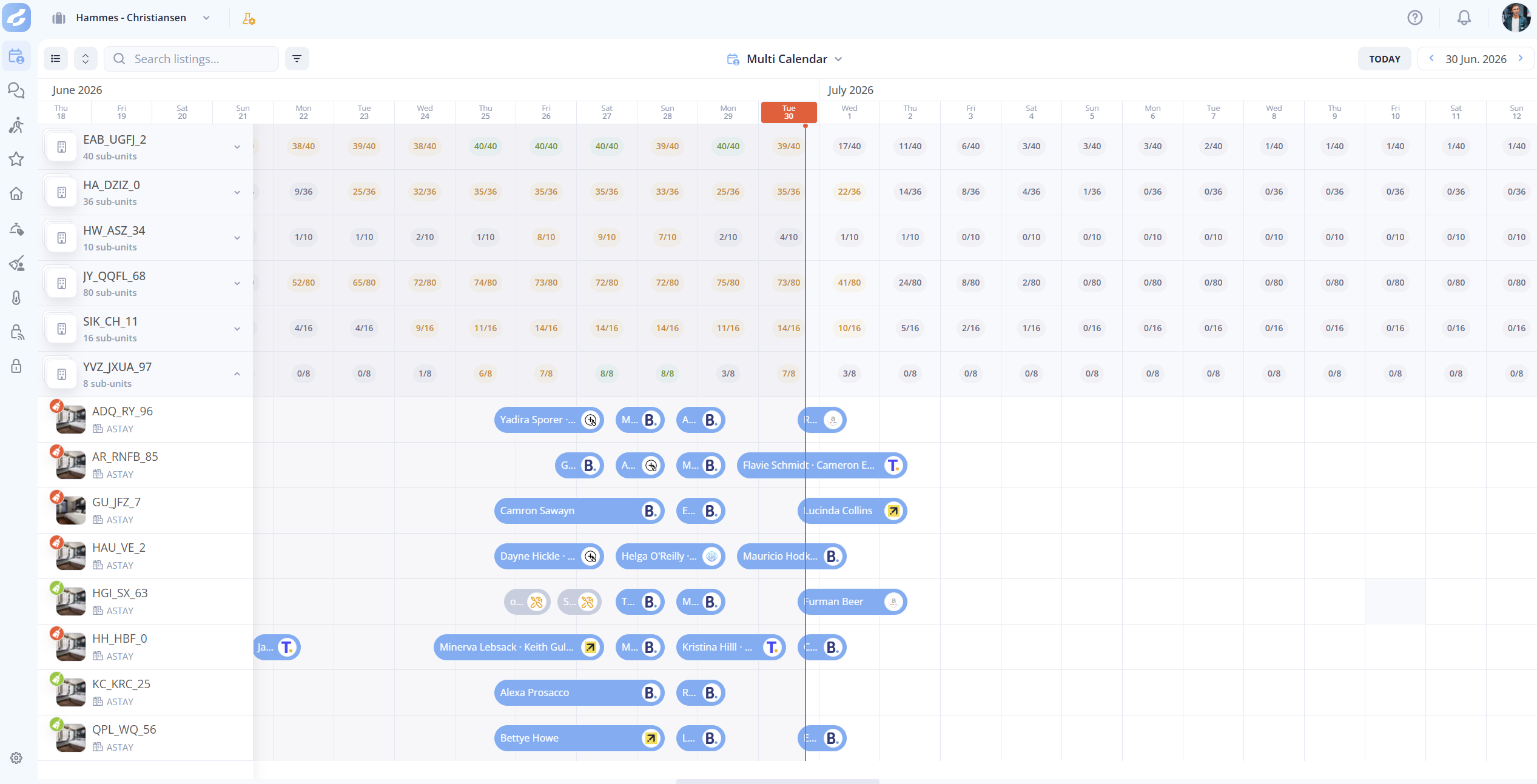
Group multi-unit listings in the calendar. Collapse grouped units for a cleaner overview, with unit availability visible at a glance.
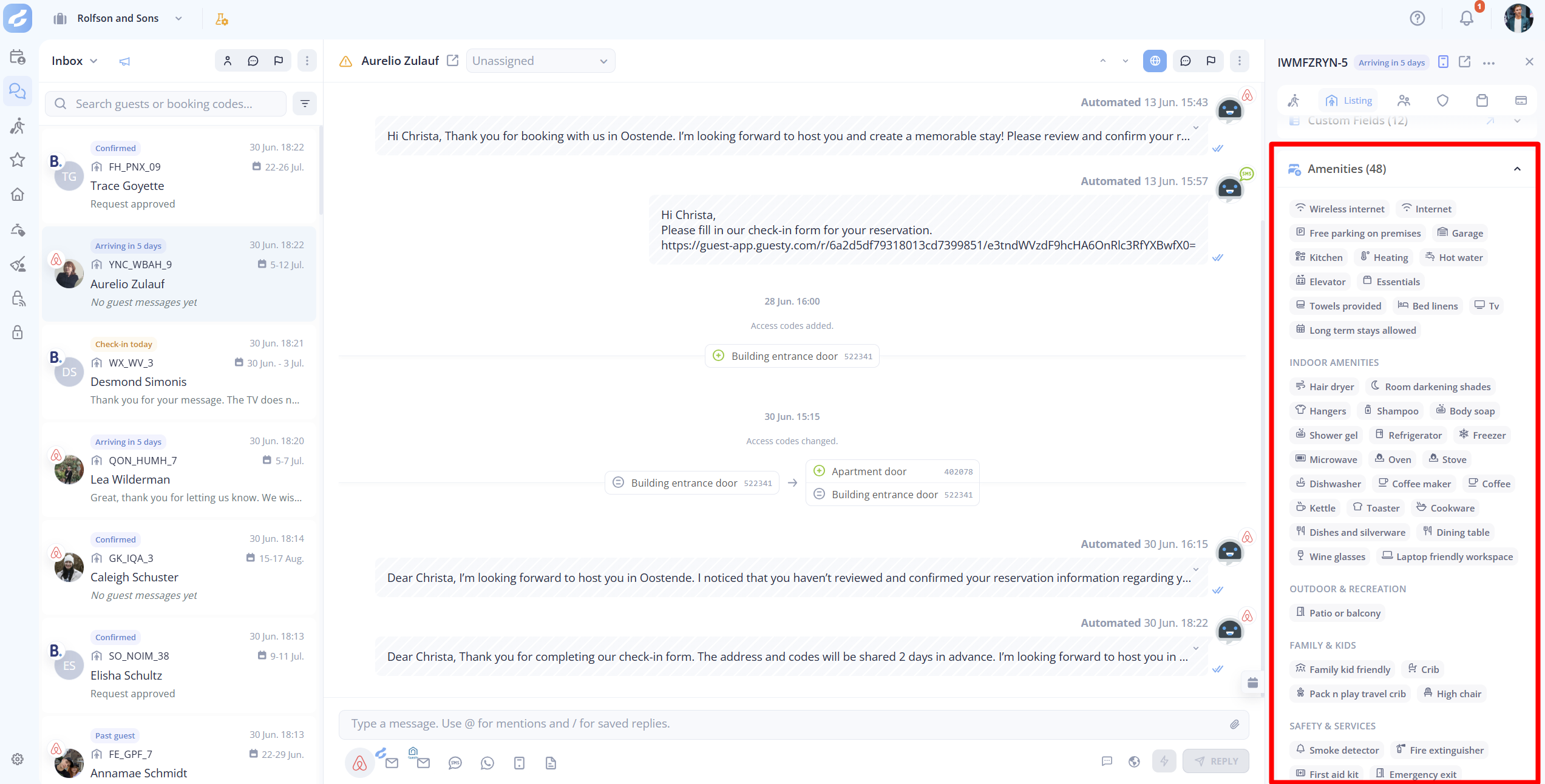
A dedicated amenities section — now usable in automations. Amenities are grouped into clear categories on listings and appear in the inbox property panel, and your automation rules can now use amenities as conditions to tailor messages to what a unit actually offers.
See additional guests on a reservation. Quickly view everyone connected to a booking and reach their available contact details.
More ways to filter and find. Filter custom fields by date, time, and dropdown values; sort reservation lists by estimated arrival or departure; and filter conversation lists by property complex.
Set a specific branding email address. Brandings can use a full email address instead of only a domain, giving you more control over the sender address guests see.
Stricter ID-verification storage options. New privacy settings let you delete ID images after pre-check-in, or choose never to store ID verification data.
🚀 Improvements
Pre-check-in is smoother for guests. Searchable dropdowns make long lists like country selectors easy, arrival and departure pickers are more consistent on mobile and desktop, and the flow now shows steps that better match each booking.
More resilient guest messaging. Rich formatting is available for supported channel messages in automations, and when an email can't be sent, important messages can fall back to the booking channel instead of stopping at a failed email.
Faster search and filtering across large datasets. You'll notice quicker results in listings, conversations, guidebooks, upsells, and guest matching, plus new search boxes in guidebooks, saved replies, and custom fields.
More reliable message matching. Incoming messages are matched to the right reservation and conversation more accurately — including Airbnb messages, repeat guests, and group bookings — and new social conversations show better guest names.
Clearer protection and billing. Protection setup uses clearer labels, defaults, and validation; damage-waiver pricing shows the service-fee percentage and its effect on the payout; and property billing defaults and inherited values are easier to understand.
Reservation changes are easier to review. Inbox timeline events now show clearer before-and-after details for changes like dates, listing, check-in time, estimated arrival or departure, and status.
A cleaner day-to-day interface. Amenity lists are collapsible, the sidebar and main menu expand and highlight more cleanly, and guest contact, profile, and booking details follow a more consistent layout.
Channels are easier to recognize. More booking channels show with proper names and icons, integration health indicators are steadier, and the integration catalog has been polished.
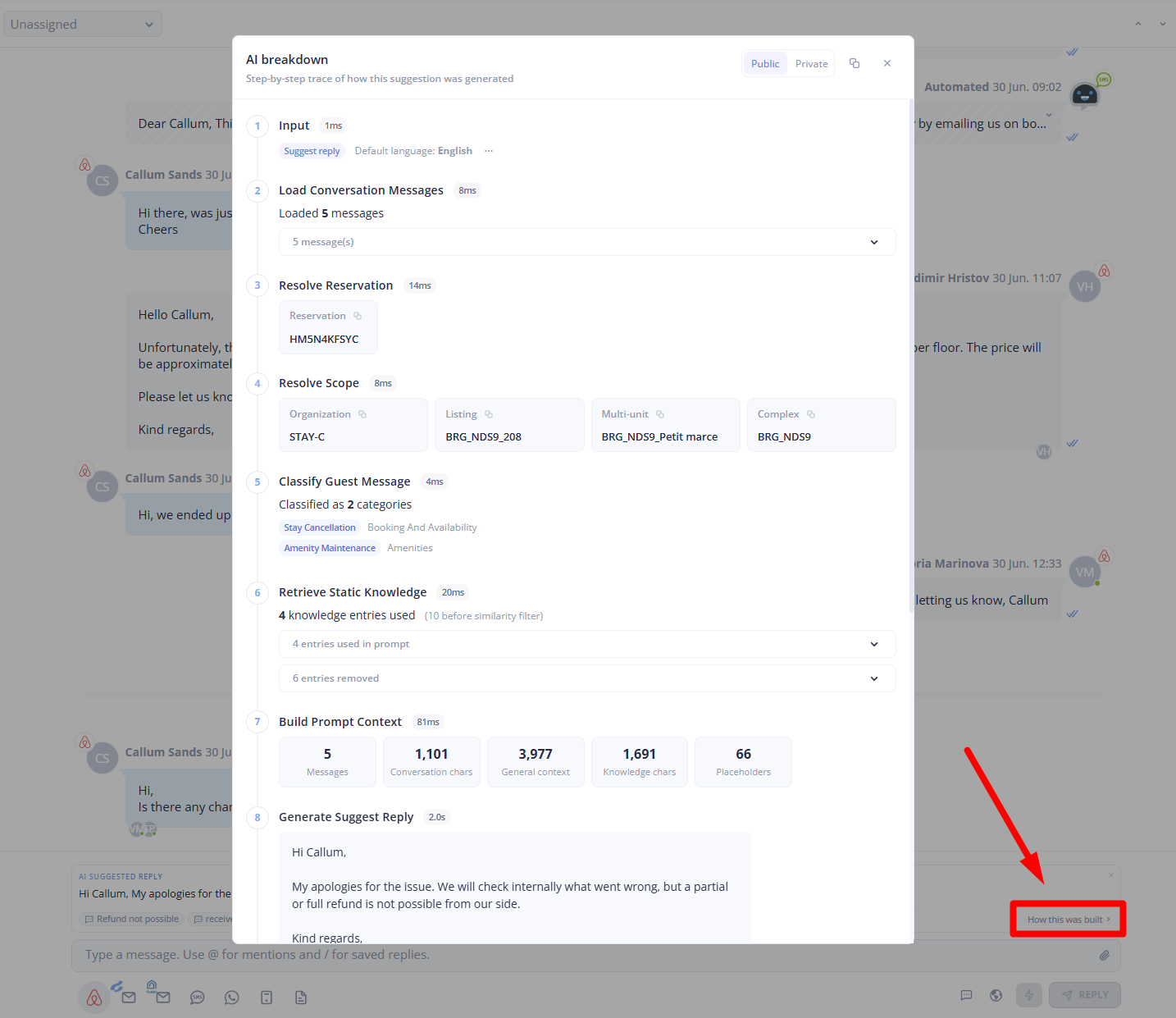
More transparent AI. Supporting quotes and clearer context help your team understand why a suggestion was made, quality checks better flag replies that may need a closer look, rewrites sound more natural, and cross-language matching is more reliable.
Plain-language guest-satisfaction labels. Filter by options like "Very satisfied" and "Neutral" instead of score numbers, with reason labels kept in English for easier review.
🗓 May 2026: Platform Improvements & New Features
This month is all about a richer guest journey and getting paid more smoothly. Guests can now sort out billing details and add-on payments during pre-check-in, and you get a dedicated Charges area to create and track payments from any reservation. We've also added Instagram and Messenger to your inbox, saved filter views across the app, and event-based automations — plus deeper syncing with your connected channels.
✨ New Features
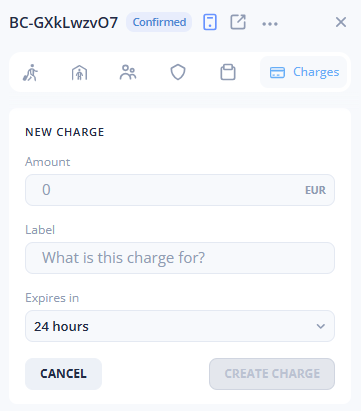
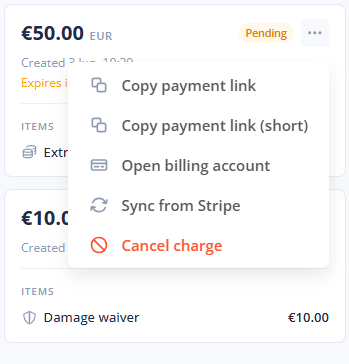
Create and manage guest charges from any reservation. A new Charges area lets you raise one-off charges, copy a payment link, check payment status, and cancel pending charges — all without leaving the reservation.
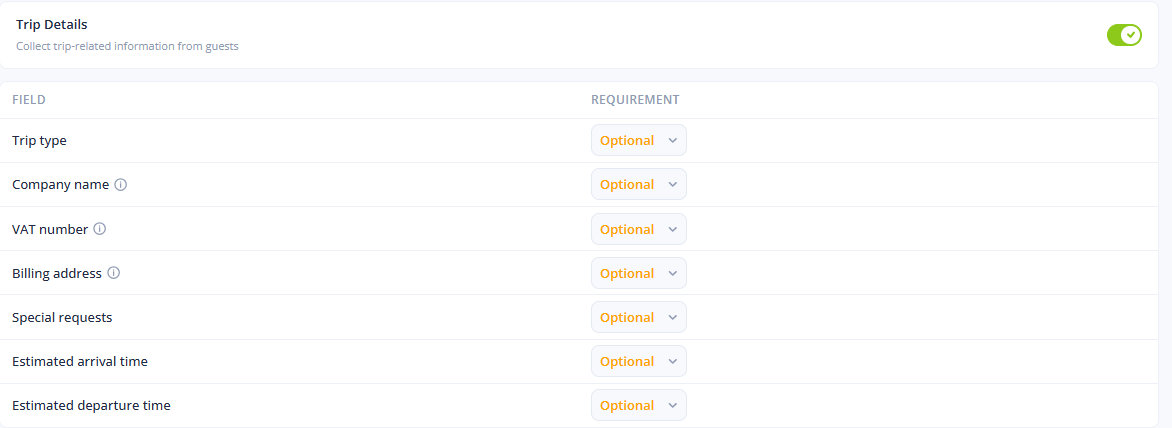
Collect billing details during pre-check-in. You can now ask guests for invoice information — company name, VAT number, and billing address — as part of the check-in flow, so your invoicing is complete from the start.
Guests can pay for add-ons before finishing check-in. If a stay includes paid extras, guests can review them during pre-check-in, remove eligible items, and go straight to payment.
Unfinished payments are easy to resume. If a guest starts a payment but doesn't finish, they're guided back to a clear outstanding-payment screen where they can complete or cancel it.
Instagram and Messenger conversations will be live soon in your inbox. Manage guest messaging from Instagram and Messenger right alongside your other channels. Meta is approving this feature as we speak and it should be live in the next few days.
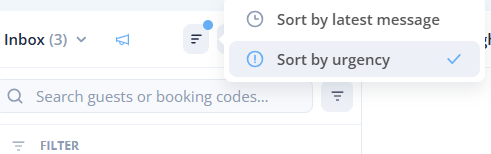
Sort your inbox by urgency. Attention-focused inbox views can now surface the most urgent conversations first, so important guest messages are easier to spot. When using the "Needs Reply" or "Assigned to me" filter, the inbox will automatically sort by urgency by default.
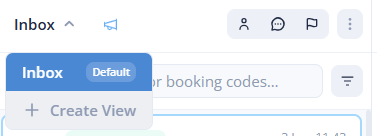
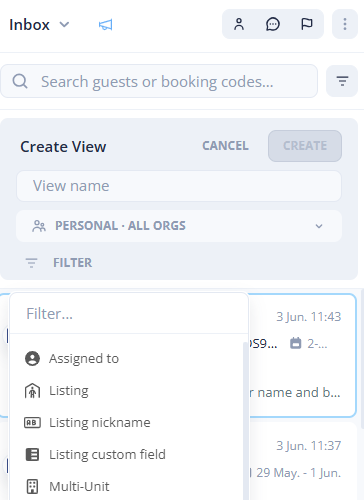
Save and reuse filtered views across the app. Save your favourite filter setups, switch back to them instantly, and share them where allowed — now available in Inbox, Reviews, Multi Calendar, Reservations, Locks, Clean Teams, and Service Templates.
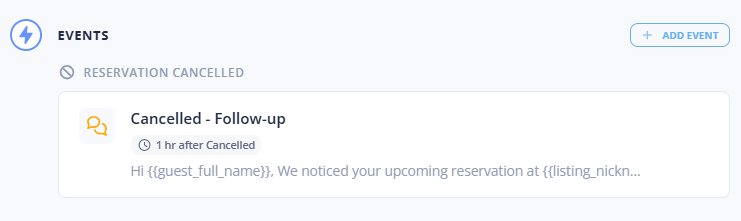
Automations can now start from an event. Build automations that trigger when something happens — starting with reservation cancellations — and add a delay if you need one.
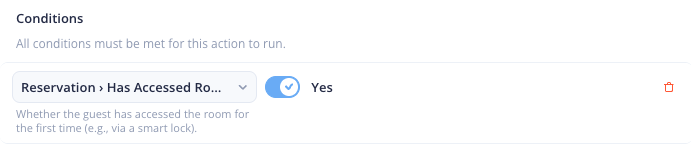
Automations can react to a guest's first room access. Trigger arrival, check-in, and follow-up workflows based on when a guest first enters their room.
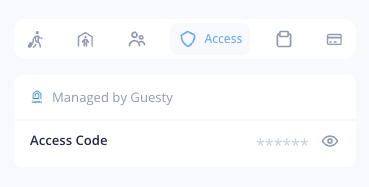
See access codes managed outside Guestway. When access codes come from a connected system, they now appear in the reservation's Access tab, along with their source when available.
Build custom HTML emails with a dedicated editor. A clearer writing experience with live preview and easy placeholder insertion makes rich, branded emails simpler to create — with more room for longer designs.
Export ID verification usage for holding invoicing. Download a monthly CSV with reservation codes, stay dates, and verification counts to make billing straightforward.
Airbnb listing photos now sync into your listing records. If your Airbnb listing has photos, they're pulled in automatically so your listing details stay complete. (This requires that you've setup the direct integration with Airbnb inside of Guestway)
🚀 Improvements
Email placeholders work in more places. Use placeholders in email subject lines and branding signatures.
Saved replies show compatibility more clearly. If a saved reply uses placeholders Guestway can't safely fill, you'll see exactly which parts need attention.
Pre-check-in can finish automatically after inactivity. If a guest completes every required step but forgets to submit, Guestway can complete the process for them after 15 minutes of inactivity.
More flexible automations. Build rules that account for missing values, with added support for date, time, number, yes/no, and dropdown custom fields.
Clearer ID verification statuses, easier exports. More verification statuses are recognised correctly, and billing export files now include clearer identifying details.
Smoother payment account setup. Connecting or continuing your payment setup is now more straightforward.
Multi Calendar filters are more flexible. Filter by multi-unit and complex to focus on exactly the properties you want.
Custom fields are easier to browse. They sort in a more helpful order, with a search box when you have many of them — and time fields now use a proper time picker.
Richer details from your connected channels. More guest details (birth date, nationality, preferred language, gender) and more note types now sync from Mews, listing-specific addresses are supported across more platforms, and a wider range of amenities and booking channels is recognised.
(Guest Portal) Access codes are clearer when there's more than one. Guests now see plainly when multiple codes are available.
🐛 Bug Fixes
Door-opening automations work again. Automations using supported smart locks complete the open-door action reliably.
Airbnb reservation statuses are more accurate. "Checkpoint voided" reservations now show as canceled, and alteration requests no longer get stuck in the wrong state after they're resolved.
Clearer WhatsApp image upload errors. If a template header image can't be uploaded, you'll get a helpful message explaining why.
🗓 April 2026: Platform Improvements & New Features
Stronger pre-check-in, smarter payments, and more powerful custom fields
April brought a major refresh to pre-check-in — a redesigned journey editor. We also rebuilt billing accounts with a flexible property-level hierarchy, opened up custom fields with new types and two-way PMS sync, and brought channel cases, host reviews, and alterations directly into the spaces where you already work.
🌍 Customer Support
New AI support tool
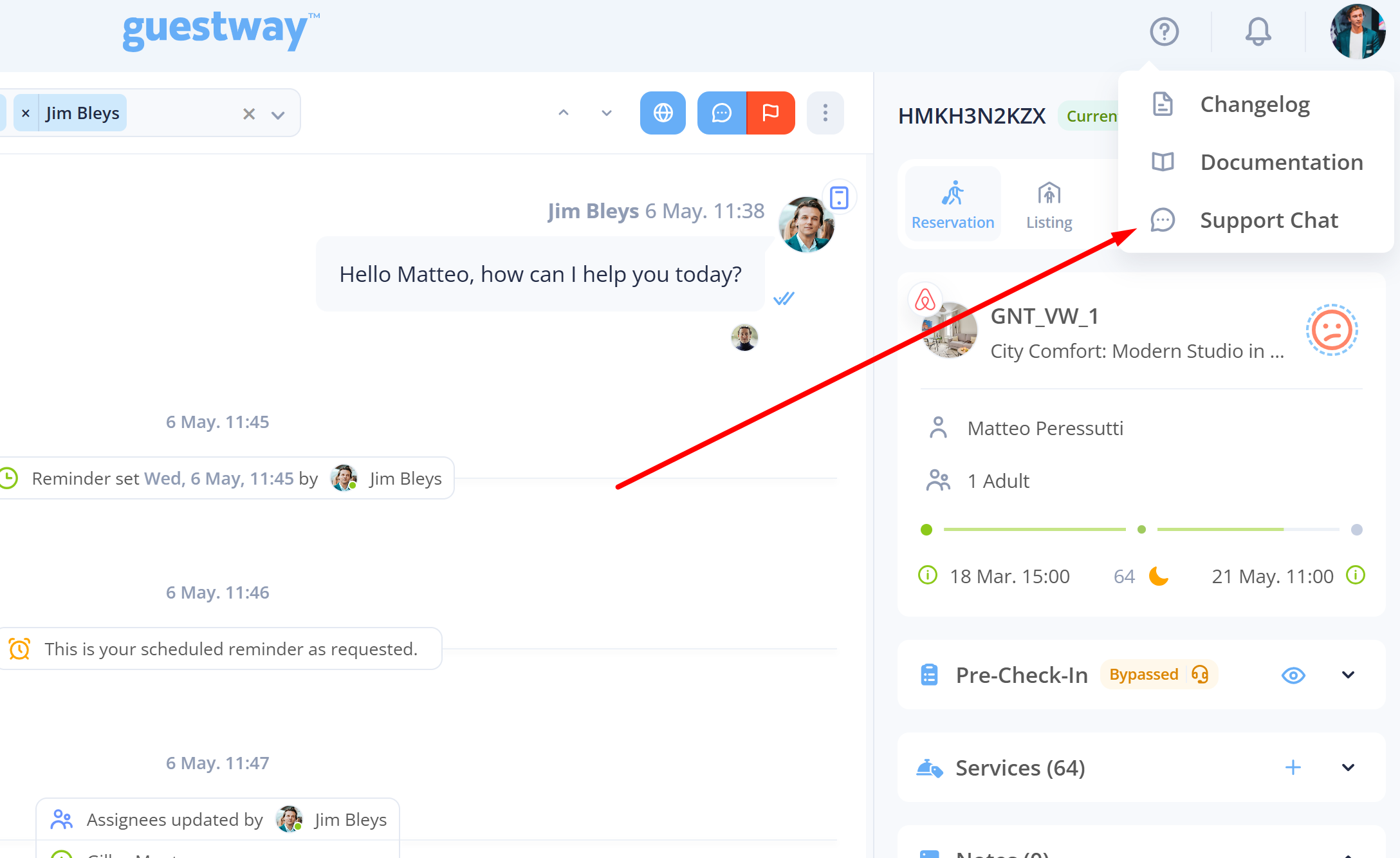
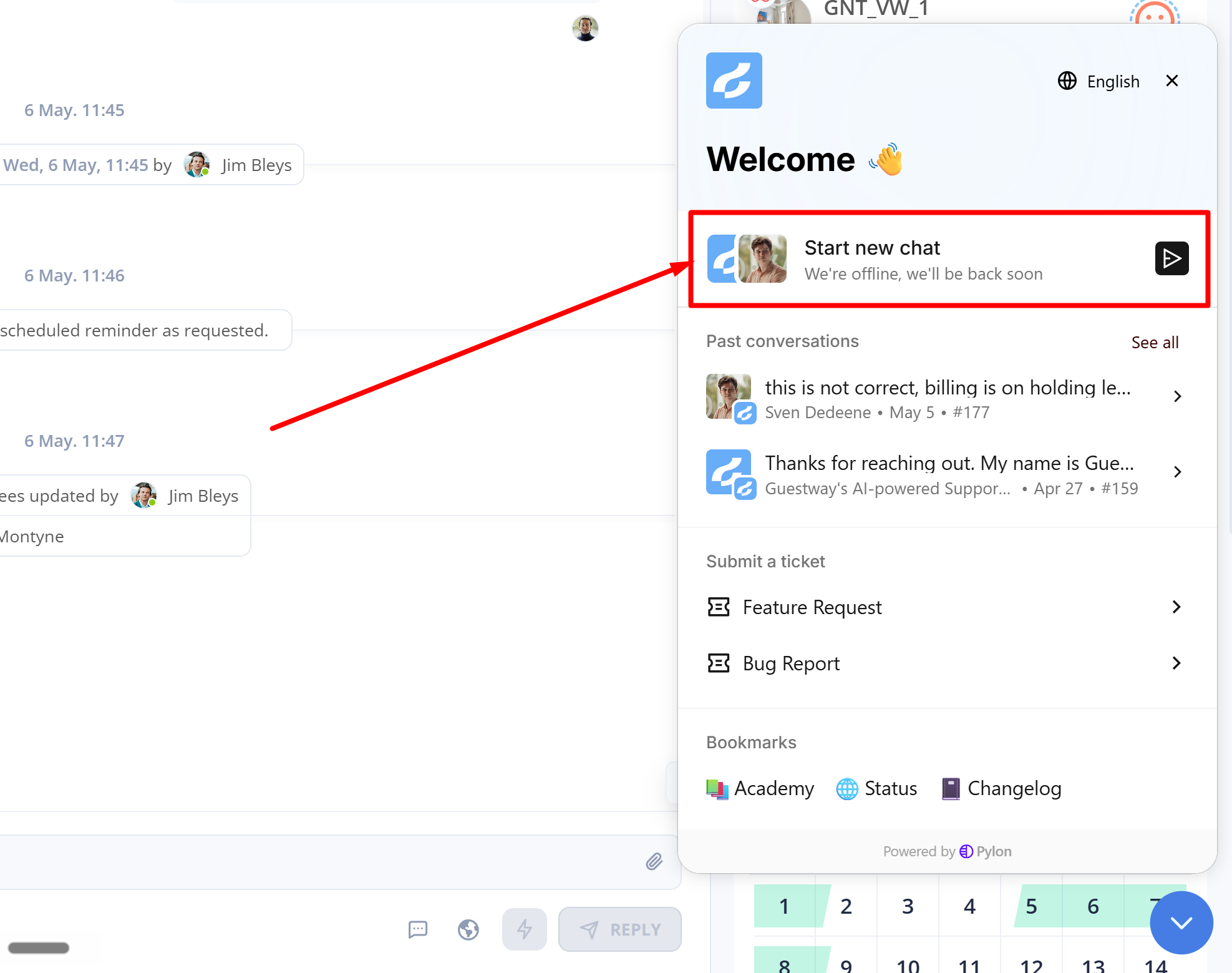
You can now ask all your questions directly within Guestway. Our AI support bot is trained on all of our documentation and will be able to help you out in almost all cases. In case you do need human support it will log this to us directly so we can jump in and help you personally. The chat support function can be found through the following steps:
Guestway Academy Update
Our Guestway Academy got a full update, all the newest and older features are again up to date. You can easily navigate to the academy from within the platform, have a look at the quick tutorial below:
https://app.guideflow.com/player/9r20g9gsop
🏠 Pre-check-in & Guest Journeys
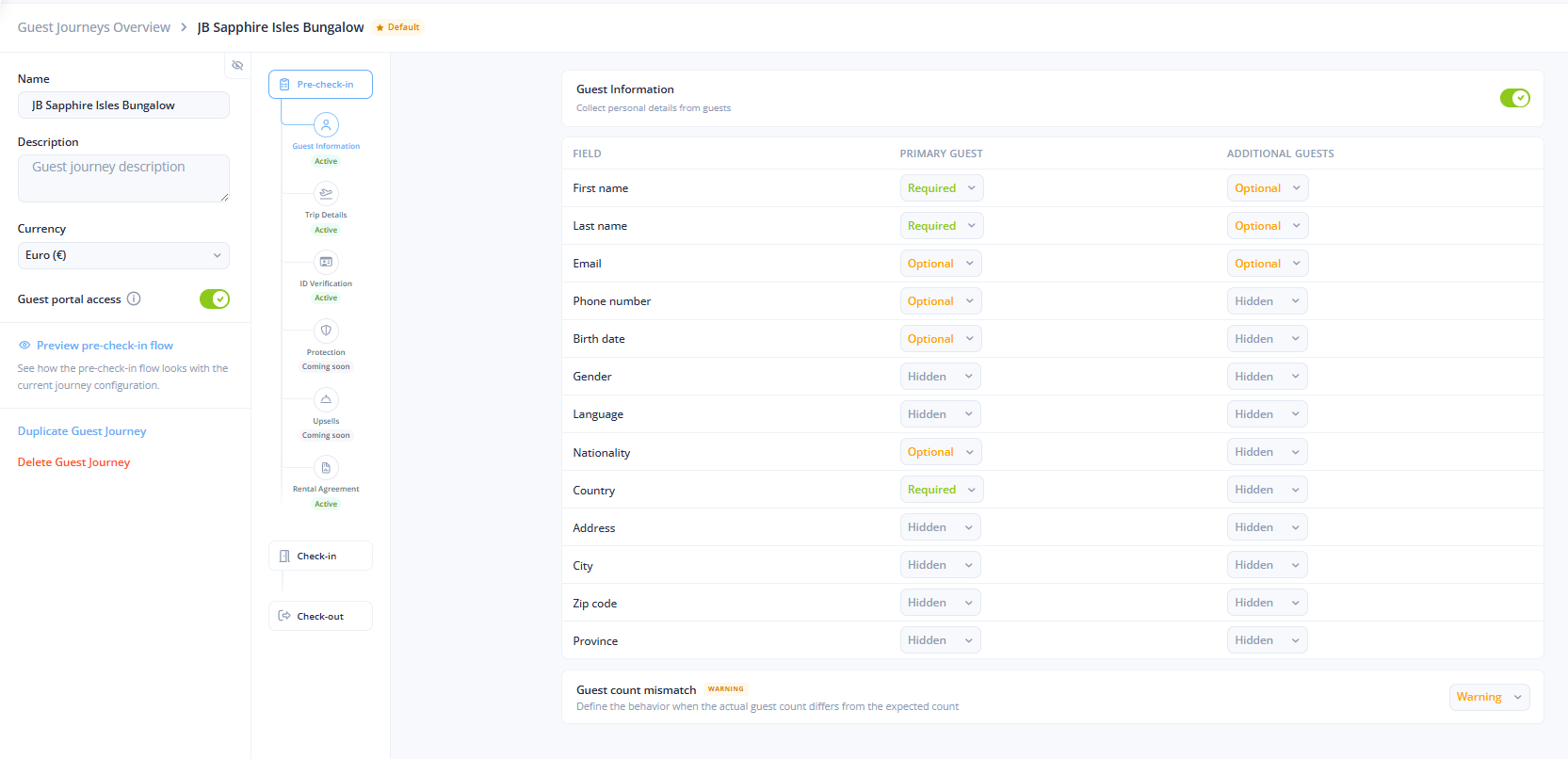
A redesigned guest journey editor
The journey editor has been reorganized with a clearer timeline, improved step states, and a collapsible settings panel — making larger journeys much easier to manage.
Why it matters: Setting up and refining pre-check-in flows is faster, especially when you're working with many steps.
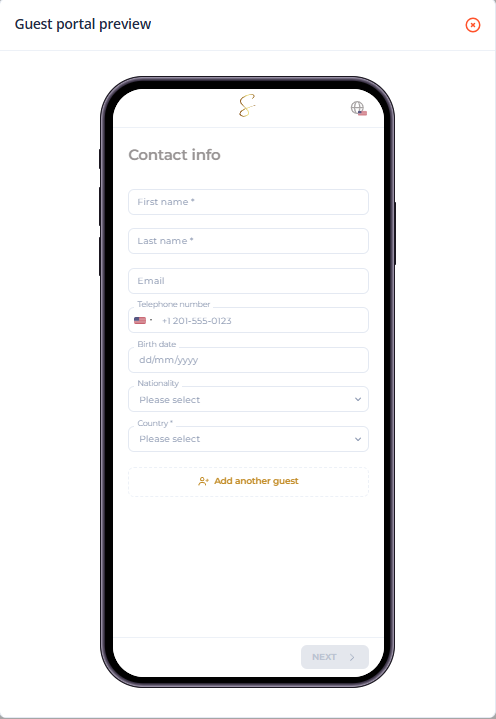
Live preview for pre-check-in journeys
You can now preview the guest pre-check-in experience while editing a journey, so it's easy to verify the flow before publishing changes.
Why it matters: Catch issues before they reach guests, without testing on a live reservation.
Protection step in pre-check-in (Beta-testing is live)
Pre-check-in now includes a dedicated Protection step where you can offer damage waivers and security deposits inside the same flow. Guests can add or remove protection during pre-check-in without leaving the journey. This feature will be available for all customers in the coming weeks.
This will come with a dedicated damage waivers view which will give you a single place to track waiver status, coverage, who paid, and related charge details across your portfolio.
Why it matters: Coverage decisions happen alongside everything else — no awkward redirects, no broken context.
More flexible ID verification
You can now choose whether guests must take a selfie and whether they're allowed to upload images from their device. If a check fails, guests can retry without restarting. Verification screens also explain the process more clearly and show more helpful reasons when something goes wrong.
Why it matters: Fewer guests get stuck mid-verification, and you have more control over how strict the check is.
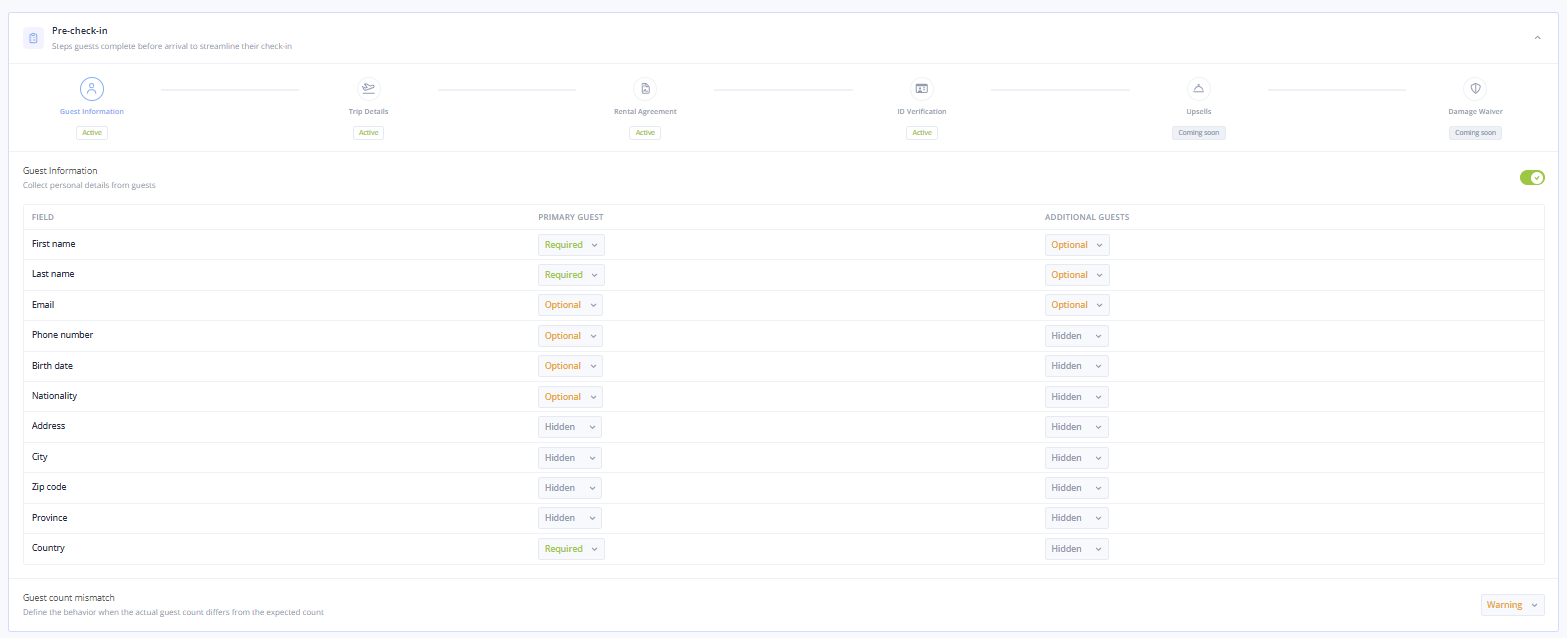
Capture more guest details during pre-check-in
Pre-check-in can now collect guest language and gender when needed, and these details appear cleanly in the registration summary and on the guest record.
Why it matters: Richer profiles mean downstream personalization — like translated messages — works better out of the box.
Clearer pre-check-in progress labels
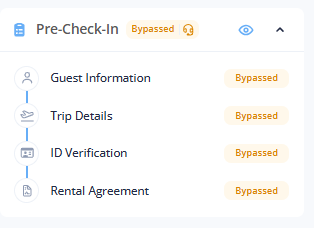
Statuses now distinguish between Not started, Opened, and In progress, and the Bypassed status displays correctly when check-in has already happened.
Why it matters: No more guessing whether a guest has actually engaged with the flow.
💳 Payments & Billing
Hierarchical billing accounts
You can now assign a billing account at the organization, complex, multi-unit, or listing level. Child properties inherit from their parent or use their own account when needed.
Why it matters: Multi-property operators can route charges precisely without one-off configuration on every listing.
Manage billing accounts from settings
A new section in settings lets you view billing account status, refresh connections, and disconnect when needed. The area previously labeled Billing at the holding level is now called Invoicing, making it clearer where to find invoices, payment methods, and history.
Why it matters: Connected payment setup is finally self-serve, and the naming matches what's actually inside.
🔄 Custom Fields & PMS Sync
More custom field types
Custom fields now support dates, times, and dropdown options — in addition to text, numbers, and yes/no.
Why it matters: Capture structured data (arrival times, preferences, scheduled events) without forcing it into free text.
Two-way custom field sync with connected property systems
Custom fields from supported PMS connections now sync into Guestway, and changes made in Guestway can sync back — for listings, multi-units, and reservations.
Why it matters: Property data stays consistent across systems without manual reconciliation.
Inheritance across listings and multi-units
You can now see when a listing is using a value inherited from a parent multi-unit, with one-click options to copy or switch back to the parent value.
Why it matters: Manage shared settings centrally while still overriding where it makes sense.
Deactivate, hide, or clear custom fields
You can deactivate synced custom fields instead of deleting them (which would break the sync setup), hide fields you no longer use, and intentionally clear values when needed.
Why it matters: Tidy up forms and detail pages without disrupting integrations.
A dedicated property custom fields page
Listings and multi-units now have a clearer place to review, compare, and update custom field values one by one. Text-based fields can also store much longer answers — useful for detailed notes or guest information.
Why it matters: Bulk maintenance of property data is easier and less error-prone.
🤝 Channels, Reservations & Reviews
Handle reservation change requests from the reservation itself
You can now see what a guest requested, whether it still needs action, and any pricing impact — and approve or decline supported requests directly from the reservation.
Why it matters: No more switching between Airbnb, Booking.com, and Guestway to handle alterations.
Booking-channel cases inside reservations and inbox
If a reservation has an open or past resolution case, you can now see it where you already work. Filtering reservations and inbox conversations by case state is also easier.
Why it matters: Channel disputes stop being a separate workflow on a separate site.
Leave host reviews from the inbox
When a guest review event appears in a conversation, you can now submit your host review there and view reviews you've already sent. Hidden reviews stay consistent when visibility changes, and your translation preference (translated vs. original) is remembered more reliably.
Why it matters: Reviewing happens in context, not as a separate task you forget about.
More complete reservation pricing for channel bookings
You can now see a fuller financial breakdown — payouts, fees, taxes, and cancellations — in one place. Airbnb reservations include additional payout and tax-related amounts when available.
Why it matters: Reconciliation is faster with fewer exports.
More guest details flow in from connected systems
Guest profiles may now include extra details such as gender, birth date, nationality, and ID document number when the source system provides them. Guest language from Smoobu is now captured when available.
Why it matters: Automated messaging and personalization can do more without manual input.
💬 Inbox & Messaging
Richer inbox event cards and clearer icons
Event cards now show clearer details for ID verification updates and Airbnb resolution center activity, with direct links to related cases when available. Icons in the thread list now include tooltips, so reminders, muted conversations, flags, birthdays, and archived threads are easier to scan at a glance.
Why it matters: More context inside the inbox means fewer trips to outside systems.
Fresher reservation details in the inbox
Reservation information attached to inbox threads now updates more reliably, helping reduce stale details.
Why it matters: What you see in the inbox matches reality more often.
SMS through Twilio is now generally available
Sending SMS through Twilio is now ready for everyday use, and error messages are clearer when a message can't be sent.
Why it matters: A reliable WhatsApp-to-SMS fallback path is production-ready.
More WhatsApp options and clearer attribution
You can now connect WhatsApp accounts that use the WhatsApp Business App coexistence setup, with a simpler onboarding flow. Sent WhatsApp messages now show the sending number, making conversation history easier to follow when your team manages multiple numbers. WhatsApp template messages are also more reliable, with template variables mapping correctly so links and buttons render as expected.
Why it matters: WhatsApp at scale (and with multiple numbers) is much more manageable.
More polished automated messages and translations
Names with hyphens or apostrophes now format more naturally, line breaks survive translation more reliably, and messages already in the selected language no longer get unnecessarily rewritten. The auto-translate language selector has cleaner flag styling, too.
Why it matters: Automated messages feel more polished and personal, less robotic.
📲 Mobile, Push & Polish
Push notifications in your preferred language
Team members can now receive push notifications in their chosen language, and notifications reach the right people more consistently.
Why it matters: Multi-region teams get alerts in the language they actually work in.
New language support
Vietnamese is now supported in the app.
Draft WhatsApp Automations updated
Draft WhatsApp automations now show the template content for easier review.
Image Uploading Improved
Overhauled image uploading in the clean task with native compression and concurrent uploads for a faster, smoother experience.
A clearer guest home screen and guidebooks
The guest booking card shows check-in and check-out in a simpler timeline, and guidebook cards have a more polished, consistent layout — including a placeholder for guidebooks without a cover image. Buttons, cards, forms, and messages across the guest experience also look more consistent.
Why it matters: The guest-facing experience feels more cohesive and modern.
Setup and guidance polish
Instructions for things like email forwarding (now configurable during onboarding) and WhatsApp templates are easier to follow. Inherited checklists explain where they came from and how to override them. Access token permissions are also labeled more clearly.
Why it matters: Self-serve setup is more discoverable, with less back-and-forth with support.
🗓 March 2026: Platform Improvements & New Features
We've shipped a packed month of updates focused on safer automations, better messaging control, improved pre-check-in flows, and new/deeper integrations with PMS systems.
Here's what's new:
⚙ Automations & Messaging Control
Review automated messages before they're sent
Automations can now create draft messages instead of sending them right away. Your team can review, approve, decline, or edit drafts before they go out.
Why it matters: More control over what guests actually receive — especially useful during onboarding or when fine-tuning workflows.
Test automations without messaging real guests
Automations can now be marked as "testing," which creates drafts instead of sending live messages. This makes it much easier to test and iterate on workflows safely.
Why it matters: Build with confidence — no more accidental messages to guests while you're setting up.
Fallback messages to another channel automatically
If a message can't be delivered through one channel, Guestway can now try a backup option like email or SMS automatically.
Why it matters: Fewer missed guest communications, less manual follow-up.
Preview message variables before sending
You can now preview saved replies and broadcast messages with placeholders filled in before sending. Catch missing details before a message goes out.
Why it matters: Reduces errors and improves confidence when sending templated messages.
🏠 Pre-check-in & Guest Portal
Guest Portal now prompts before refreshing to a new version
Instead of reloading unexpectedly, guests now see a clear message when an update is available or when the guest journey is updated.
Why it matters: Smoother guest experience — no more lost progress during pre-check-in.
Pre-check-in flow feels more polished on mobile
Navigation, layout, and language switching have been cleaned up for smaller screens.
Why it matters: A better first impression for guests completing pre-check-in on their phone.
Guidebooks work more smoothly during pre-check-in
Guests can now move between guidebooks and check-in more easily without losing their place.
Why it matters: Less friction in the guest journey.
Guest details collected during pre-check-in are more complete in connected systems
Information like birth date, nationality, ID number, and travel purpose now syncs more reliably to connected PMS systems where supported.
Why it matters: Fewer manual data entry tasks for your team.
💬 Inbox & Conversations
Custom fields in Settings
You can now add your own custom fields to store extra information for reservations or properties in a more structured way.
Why it matters: Tailor Guestway to your operations without workarounds.
Inbox shows pre-check-in completion and check-in events
Your team gets a clearer view of where each guest is in their stay, with badges for current and primary reservations and quicker access to the main conversation.
Why it matters: Faster context when responding to guests.
More reservation activity now appears in the inbox
Events like skipped pre-check-in steps, upsell requests, review updates, and review-related updates now show directly in the conversation.
Why it matters: Less tab-switching, more context at your fingertips.
Guest journeys are easier to scan in settings
Guest journeys now appear in a card-based layout, making it simpler to see steps, defaults, and portal status at a glance.
Why it matters: Faster setup and review of your guest journey configuration.
🔄 Integrations & Syncing
Mews is now fully available
Mews users can now start using Guestway and enjoy the luxury of our best in class unified inbox.
Review replies from VRBO and Booking.com now sync more reliably
Replies written directly on those channels are more likely to appear correctly in Guestway.
Smoobu guest syncing is more complete
Guest details from reservation activity now update faster and more reliably.
More guest details can sync to connected systems
Information collected during pre-check-in — such as birth date, nationality, ID number, and travel purpose — now flows through more completely where supported.
📱 Push Notifications & Mobile
Push notifications are easier to read on mobile
Stray formatting is removed more reliably, so messages appear cleaner.
Translated content now keeps images and formatting better
Rich-text translations are more faithful to the original content and easier to read.
🗓 February 2026: Platform Improvements & New Features
🏠Guest Journey (Updated)
Guest Journey has been refreshed with an improved flow and layout.
Optional ID verification is now available — choose between:
Identity Verification validates the guest’s ID.
Identity Plus Verification validates the ID and matches it to a selfie for an extra layer of assurance.
Pricing (from April 1st):
Identity Verification: €0.49 / verification
Identity Plus Verification: €0.99 / verification
To enable ID verification, contact your Account Manager.
Upsells coming soon
Damage waivers coming soon
🧭 Navigation, Holdings & Hubs
HQ mode replaced by Hubs
Two hub types introduced
Private hubs (personal, user-created)
Holding hubs (created by holding owners, available to users under those orgs)
Holdings visibility + structure updated
Only holding owners can create new organizations under a holding
Holding owners can be added in the holding settings under "owners"
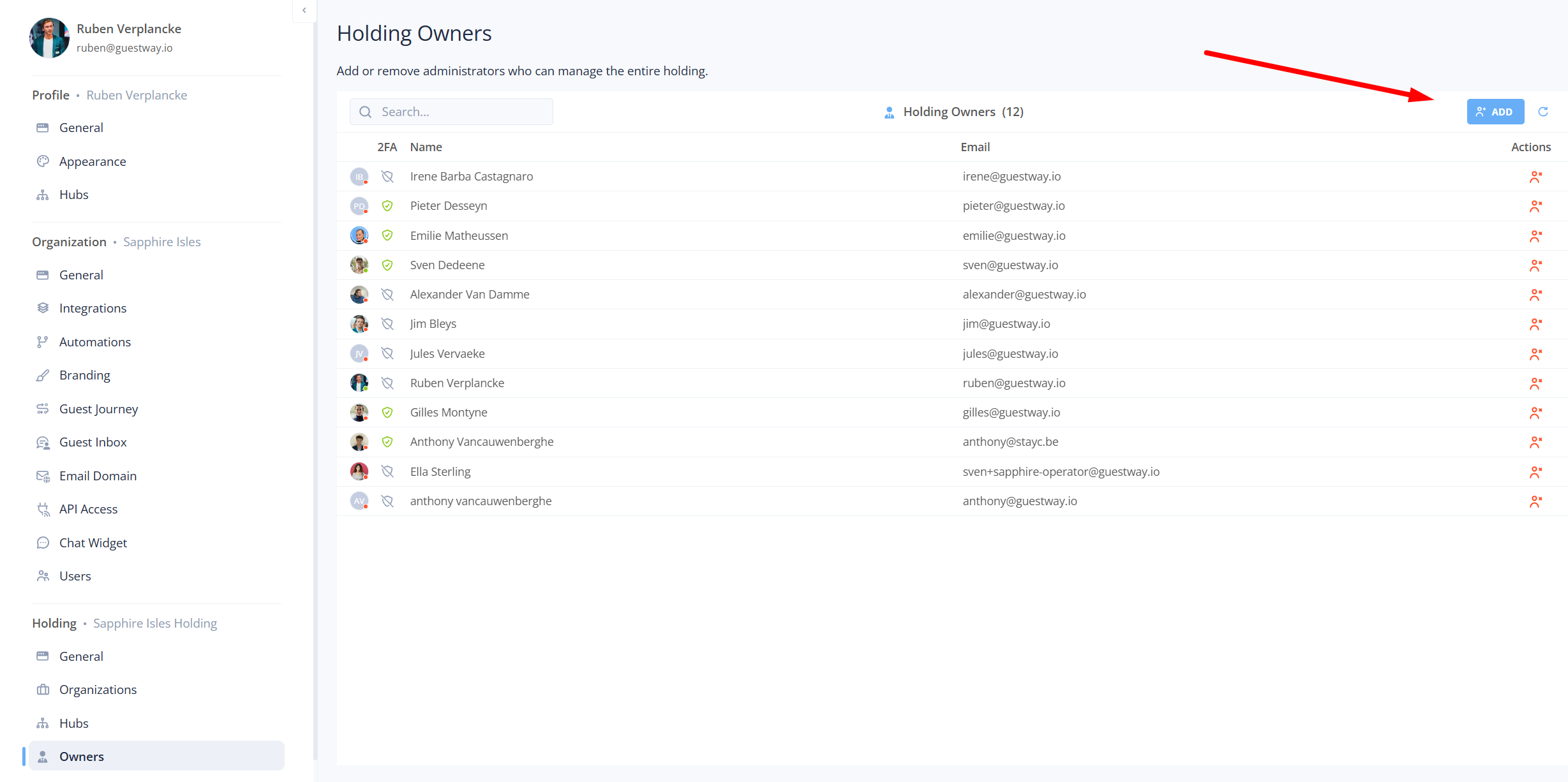
Settings page redesigned to support the new structure
Organization switcher redesigned
Now split into two sections: Hubs and Organizations
🌍 Language & AI Preferences
New settings added under "profile" > "general"
Preferred Inbox Language (translation in unified inbox conversation)
AI Default Language (affects AI-generated content in Inbox and Review Center)
(add screenshot)
💬 Unified Inbox Improvements
SMS character limit increased: 350 → 700
Voice notes + video playback supported inline (especially useful for WhatsApp)
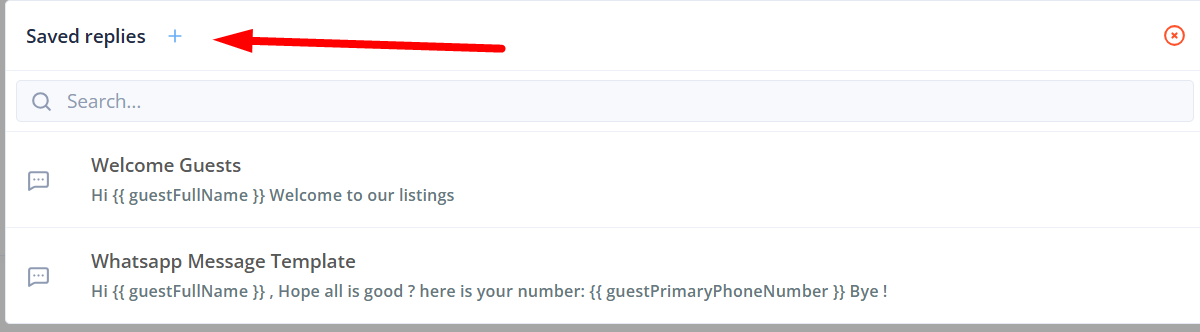
WhatsApp saved replies → Meta Business redirect
Jump directly to Meta Business Portal to manage/create templates
Auto-translation now persists across conversations
Toggle once per session (no longer per conversation)
Emoji translation bug fixed
Emojis now remain intact when translating
Reservation notes: new inbox view + two-way PMS sync
Notes sync from PMS → Guestway
Edits in Guestway sync back to PMS (guest/host/reservation notes)
Specifically for the following Property Management Softwars (PMS):
Guesty: 5 types (cleaning, guest, other, special requests, owner note)
Apaleo: 2 types (comment, guest comment)
Smoobu: 2 types (notes + assistant notes) + fallback guest info
Hostaway: 3 types (host, guest, comment)
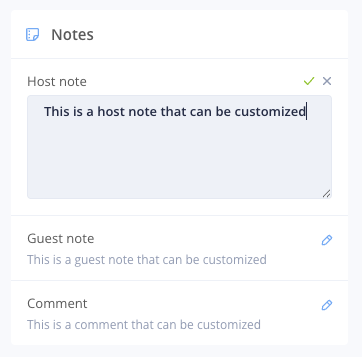
Internal notes specifically now support attachments
📲 Mobile & Tablet
Attachments on mobile
Mobile app now supports attachments similarly to web
Arabic added to mobile app + RTL ("right to left") support
iPad/tablet experience significantly improved
Better layout and usability for larger screens
🔄 Airbnb Direct Actions (Inbox)
For accounts with direct Airbnb integration:
Pre-approve inquiries
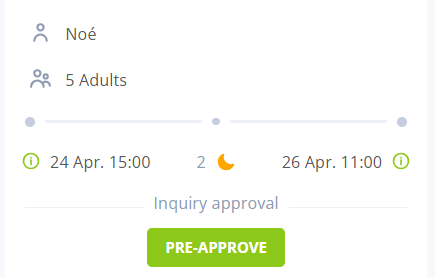
Approve/decline reserved reservations
(alterations for reservations coming soon)
⚙ Automations (Currently in experimental mode)
Automation basics: documented in Guestway Academy:
https://docs.guestway.io/settings/organization-settings/automations
New capabilities
Waiting conditions on actions (1–15 per action)
Supports a maximum wait time so actions don’t wait indefinitely
More action types
Conversation notifications: Needs reply, Flag, Add internal note
Webhook action (experimental): send a webhook to your URL
Ad-hoc email: email an internal recipient (not only guests)
Inbox automation schedule view
See what ran, what’s queued, and what’s scheduled next
🌱 Growth
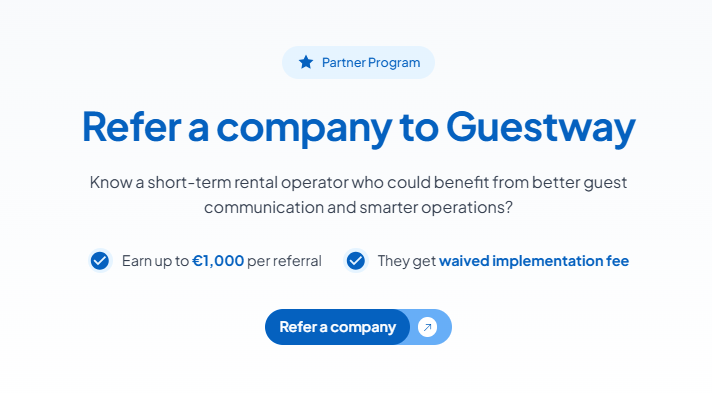
Referral program launched:
https://www.guestway.io/referral-program
🗓 January 2026: Platform Improvements & New Features
We’ve shipped a set of updates focused on better security, faster workflows, and smoother day-to-day operations. Here’s what’s new:
🔐 Improved Security & Access Control
Enforce 2FA for all users
You can now enforce two-factor authentication across your entire organization, instead of per role. This helps teams meet stricter security requirements and reduces account-level risk.
Why it matters: More consistent security, fewer weak links.
Email domain blocking restricted to Super Operators
Non-Super Operators can no longer block email domains themselves. They’ll now need to request this change from a Super Operator.
Why it matters: Prevents accidental lockouts and keeps sensitive access controls centralized.
💬 Inbox & Communication Improvements
New inbox filter: Currently staying
We added a “Currently staying” filter in the inbox so teams can instantly focus on guests who are on-site right now.
Why it matters: Faster prioritization and quicker responses where it matters most.
Create guidebooks directly from the inbox
You can now create a guidebook straight from an inbox conversation, without switching screens.
Why it matters: Less context switching, faster guest support.
Create saved replies from inbox
Saved replies can now be created directly from the inbox.
Why it matters: Turn real conversations into reusable replies in seconds.
🏠 UI Improvements
UI improvements in Properties
We’ve refreshed the Properties interface to make it clearer and easier to navigate.
🧩 Platform & Support
Support widget added to the Guestway platform
A new in-app support widget is now available, making it easier to get help without leaving Guestway.
Why it matters: Faster answers, less disruption to your workflow.
🌍 Language Support
New language added: Arabic
The Guestway app now supports Arabic, expanding accessibility for teams and guests.
Why it matters: Better support for international teams and regions.